


Fine-tuning Language Models on Apple Silicon with MLX
Fine-tune open language models locally on your Mac using MLX. No cloud GPUs or costs required.
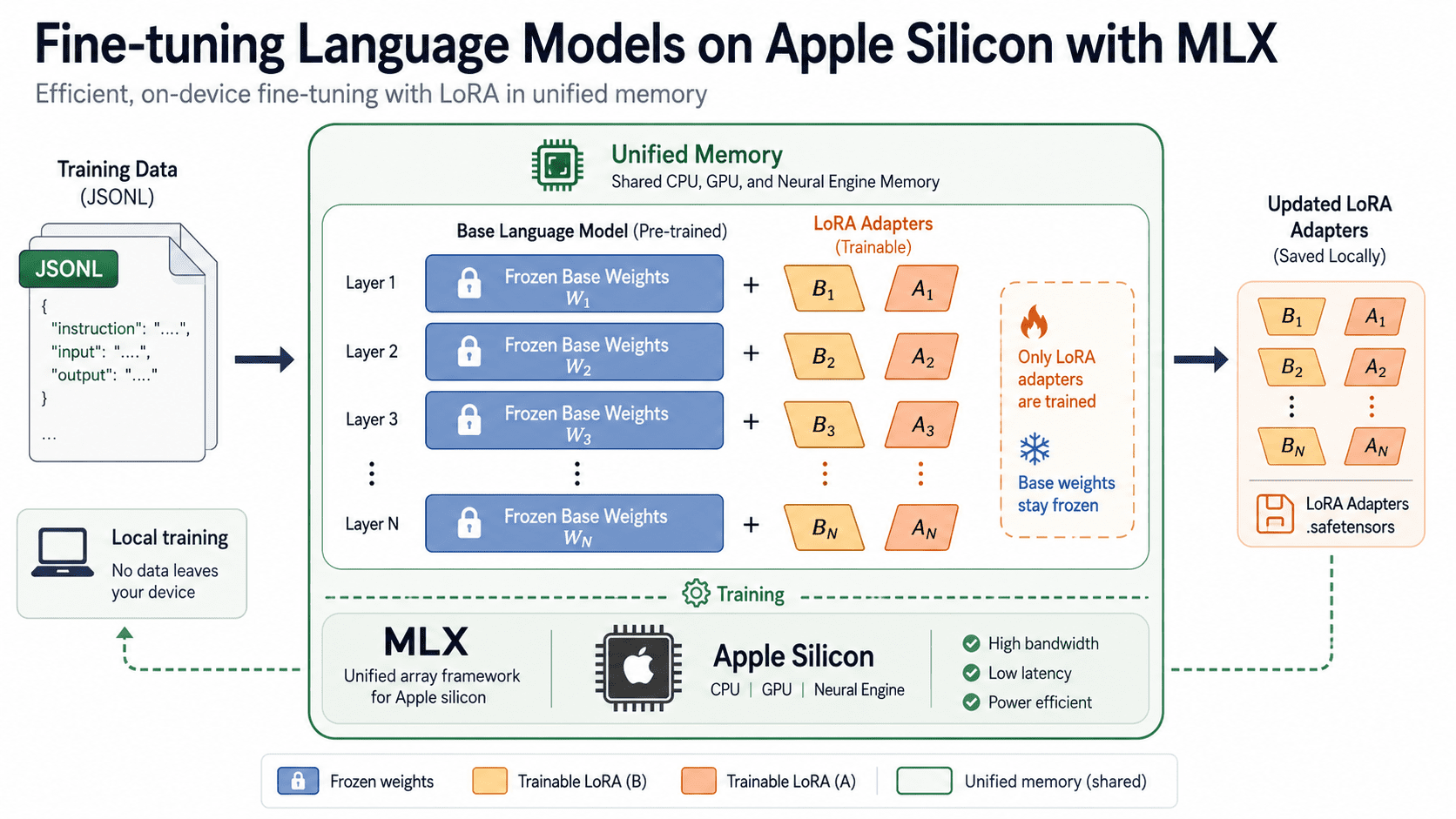
# Fine-Tuning Language Models on Apple Silicon with MLX
Fine-tuning a language model used to mean renting cloud GPUs and watching the meter run. If you own a Mac with an Apple Silicon chip, you can now adapt an open model to your own data locally, at zero cloud cost, using a framework built specifically for the hardware sitting in your laptop.
I made the switch from Windows and Dell machines to Mac back in 2014 and never looked back. What started as curiosity about a cleaner operating system turned into a deep appreciation for how tightly Apple integrates hardware and software. Over a decade later, that integration is paying dividends I never anticipated, most recently in the ability to fine-tune language models entirely on-device, without a cloud bill or a single byte of data leaving my machine.
That capability is powered by MLX, an open source array library from Apple's machine learning research team, and its companion package MLX LM, which provides text generation and fine-tuning for thousands of open models through a small set of commands. This tutorial walks through the full process end to end: installing the tools, preparing a dataset, training a LoRA adapter, shrinking memory use with quantization, then testing and serving the result. By the end, you'll have a fine-tuned model running on your own machine and a repeatable workflow you can point at any dataset.
# Understanding Why MLX Suits Apple Silicon
Most local inference tools started life on NVIDIA hardware and were later ported to the Mac. MLX took the opposite route. Apple's research team designed it from scratch around the unified memory architecture of Apple Silicon, where the CPU and GPU share a single pool of memory.
That design removes the copy step that usually shuttles data between system memory and dedicated GPU memory. On a 16 GB Mac, the model weights, optimizer state, and training batch all coexist in the same space, which is exactly what makes on-device fine-tuning practical rather than aspirational. The API mirrors NumPy closely, adds automatic differentiation for training, and uses Metal to accelerate GPU work while keeping that shared view of memory.
Before you start, you'll need an Apple Silicon Mac (M1 or newer), macOS Ventura 13.5 or later, and Python 3.10 or above. Intel Macs are not supported. Trying to install on one returns a "no matching distribution" error.
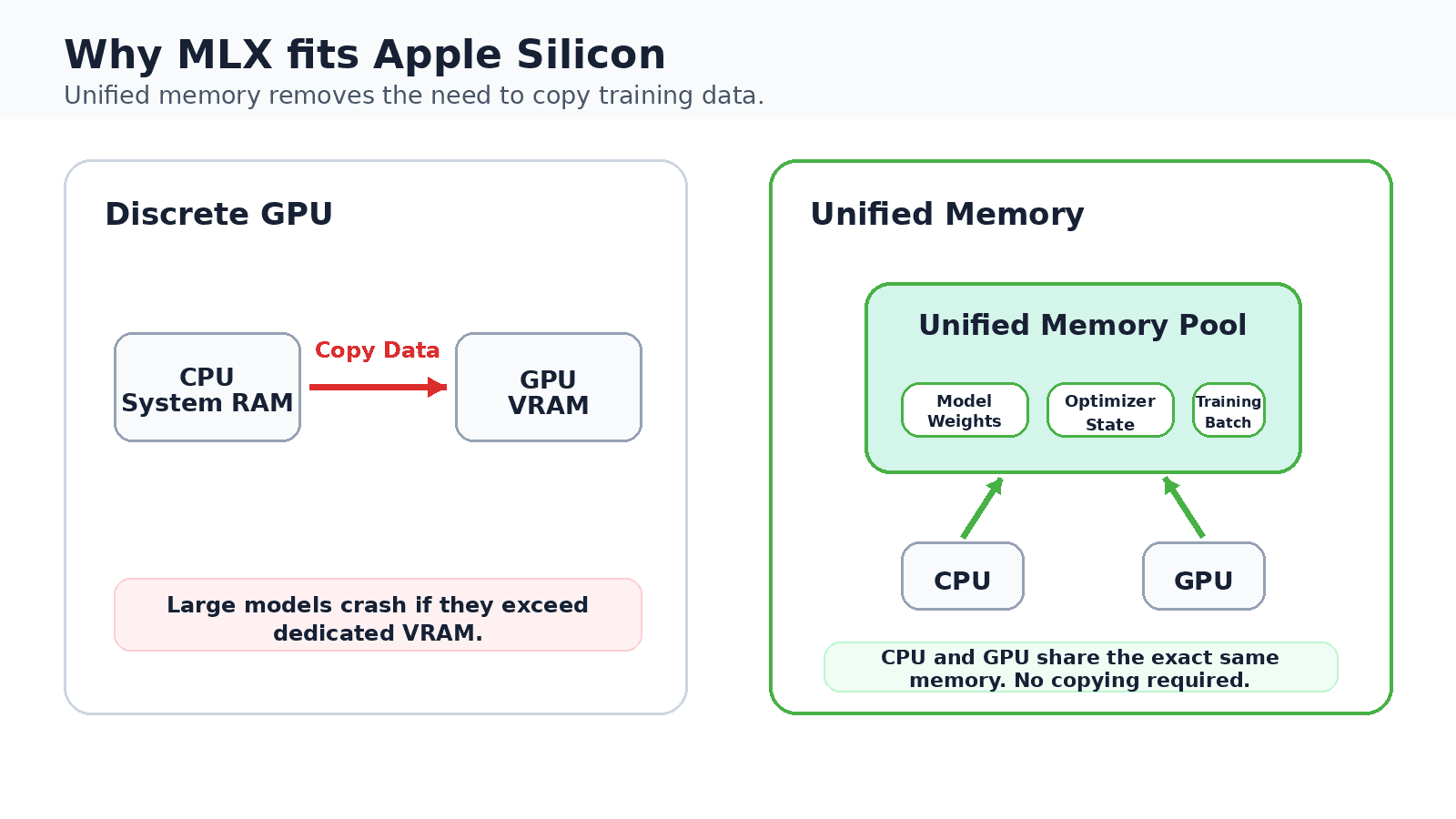
On a discrete GPU, training data is copied between system memory and dedicated GPU memory. Apple Silicon keeps one shared pool, which is what lets a 16 GB Mac fine-tune models locally.
# Setting Up Your Environment
With that architecture in mind, let's get the tools installed. Start with the package and its training extras, which pull in everything the fine-tuning commands need.
pip install "mlx-lm[train]"
Confirm the install works with a quick generation test against a small model.
mlx_lm.generate \
--model mlx-community/Mistral-7B-Instruct-v0.3-4bit \
--prompt "Explain LoRA in two sentences." \
--max-tokens 120
The first run downloads a 4-bit quantized Mistral model from the MLX Community organization on Hugging Face, caches it locally, then streams a response. The mlx-community org hosts thousands of pre-converted models, so you rarely need to convert weights yourself.
One constraint worth noting early: MLX fine-tuning requires models in Hugging Face safetensors format. GGUF files, common in other local tools, work for inference but not for training here. Supported architectures include Llama, Mistral, Qwen2, Phi, Gemma, and Mixtral, among others, so most popular open models are available out of the box.
# Preparing Your Dataset
Now that the environment is ready, the next step is getting your data into a shape the trainer can use. MLX LM reads training data from a folder containing three files: train.jsonl, valid.jsonl, and an optional test.jsonl. Each line holds one JSON example. The training file is required, the validation file lets the trainer report validation loss as it runs, and the test file scores the model after training finishes.
Three formats are supported: chat, completions, and text. The chat format is the most robust default. It stores role-tagged messages per line and lets MLX LM apply the model's own chat template, so your data matches how the model was trained to handle conversations.
{"messages": [{"role": "user", "content": "What is LoRA?"}, {"role": "assistant", "content": "An efficient way to fine-tune a model."}]}
For plain input and output pairs, the completions format is simpler and works well for instruction-style tasks.
{"prompt": "Summarize: The market rose sharply today.", "completion": "Markets gained."}
{"prompt": "Translate to French: good morning", "completion": "bonjour"}
By default, the trainer computes loss over the entire example, meaning the model spends effort learning to reproduce the prompt as well as the answer. Passing --mask-prompt tells it to compute loss on the completion alone, so training focuses on the response you actually care about. This usually produces a model that follows instructions more reliably, and it works with the chat and completions formats. For chat data, the final message in the list is treated as the completion.
Keep each example on a single line with no internal line breaks, since the reader treats every line as a separate record. Split your data so that roughly 80 percent lands in train.jsonl and 10 to 20 percent in valid.jsonl. Around 200 to 500 examples is a sensible minimum for changing a model's behavior (far fewer tend to overfit and memorize rather than generalize).
# Training Your First LoRA Adapter
With your data in place, here's where things get interesting. Rather than updating every weight in the model, Low-Rank Adaptation (LoRA) freezes the original weights and trains small adapter matrices alongside them. This drops memory and storage needs to a fraction of full fine-tuning while keeping most of the quality. The method comes from the LoRA paper by Hu and colleagues.

LoRA keeps the large pretrained weights frozen and trains only the small matrices A and B. Because just those two adapters receive updates, memory and storage stay low.
Launch a training run with one command, pointing it at a model and your data folder.
mlx_lm.lora \
--model mlx-community/Mistral-7B-Instruct-v0.3-4bit \
--train \
--data ./data \
--iters 600 \
--batch-size 1
As it runs, MLX LM prints training loss, validation loss, tokens processed, and iterations per second. Adapter weights save to an adapters folder by default. Key flags worth knowing: --fine-tune-type accepts lora (the default), dora, or full; --num-layers sets how many transformer layers receive adapters (default: 16); and --iters controls training length.
The example sets --batch-size 1 on purpose to keep memory use as low as possible. This prevents crashes on 16 GB machines. If you have 64 GB or more, raising it to 2 or 4 shortens total training time. When memory is tight but you want the smoothing effect of a larger batch, --grad-accumulation-steps raises the effective batch size without raising memory use.
If you prefer live graphs over terminal output, add --report-to wandb to log metrics to Weights & Biases. If you hit memory pressure, lower --num-layers to 8 or 4, or add --grad-checkpoint to trade computation for lower memory. These two flags are usually enough to fit a job that would otherwise run out of room.
# Choosing a Base Model and Adapter Settings
Building on the training mechanics above, two early decisions shape the rest of your run: which model to start from, and how much of it to adapt. For a first project, an 8B parameter model in 4-bit form is the sweet spot. Once the workflow feels comfortable, you can move up to 13B or 14B models, which need 14 to 18 GB of working memory and sit comfortably on a 32 GB machine.
The number of trained layers and the adapter rank together control capacity. More layers and a higher rank give the adapter more room to learn, at the cost of memory and time. A common starting point uses 16 layers with a moderate rank, then adjusts based on whether validation loss is still falling. If training loss drops while validation loss climbs, the adapter is memorizing your examples.
Learning rate matters too. Values in the range of 1e-5 to 5e-5 work for most LoRA runs. Too high and training becomes unstable; too low and the model barely moves. Change one setting at a time so you can attribute any improvement to a specific choice.
# Reducing Memory Use with Quantization
Notice that the base model above already ends in 4bit. Training a LoRA adapter on top of a quantized model is what people call QLoRA, described in the QLoRA paper. Because quantization is built into MLX, the same mlx_lm.lora command trains adapters directly on quantized weights with no extra setup.
The payoff is concrete. A 4-bit 7B model cuts weight memory by roughly 3.5 times compared with full precision, bringing a 7B fine-tune comfortably into 8 GB of working memory. On a 16 GB MacBook, that leaves ample headroom for the operating system and your training batch.
If you prefer to quantize a full precision model yourself before training, the convert command handles it.
mlx_lm.convert \
--hf-path mistralai/Mistral-7B-Instruct-v0.3 \
--mlx-path ./mistral-4bit \
-q
This writes a 4-bit version to a local folder that you then pass to --model.
# Testing and Generating with Your Adapter
With training complete, it's time to see how well the adapter learned. Score it against your held-out test set to get a number you can track across experiments.
mlx_lm.lora \
--model mlx-community/Mistral-7B-Instruct-v0.3-4bit \
--adapter-path ./adapters \
--data ./data \
--test
To see the model respond, pass the same adapter path to the generate command. MLX LM loads the base model and applies your adapter on top of it.
mlx_lm.generate \
--model mlx-community/Mistral-7B-Instruct-v0.3-4bit \
--adapter-path ./adapters \
--prompt "Summarize: Our quarterly revenue grew twelve percent."
Run the same prompt without the adapter to compare. If your dataset matched the target task well, the adapted responses should track your training examples more closely than the base model does.
# Fusing and Serving the Model
Adapters are convenient during experimentation, but for deployment you often want a single, self-contained model. The fuse command merges the adapter back into the base weights.
mlx_lm.fuse \
--model mlx-community/Mistral-7B-Instruct-v0.3-4bit \
--adapter-path ./adapters \
--save-path ./fused-model
The fused folder behaves like any other MLX model. You can serve it through an OpenAI-compatible endpoint, which lets existing client code talk to your local model after only a base URL change.
mlx_lm.server --model ./fused-model --port 8080
For a graphical alternative, LM Studio runs MLX models with a one-click local server and a chat interface, particularly useful when you want to compare your fine-tuned model against others side by side.
# Wrapping Up
You now have a complete local fine-tuning workflow: install MLX LM, format a dataset as JSONL, train a LoRA or QLoRA adapter with a single command, test it, then fuse and serve the result. Everything runs on the Mac you already own, with no cloud bill and no data leaving your machine.
For me, this feels like a natural extension of the journey that began when I switched to Mac in 2014. The tight hardware-software integration that first drew me in has quietly evolved into something far more powerful, a machine capable of serious machine learning work at the kitchen table.
A few directions are worth exploring next. Try the dora fine-tune type and compare its results against plain LoRA. Adjust the number of trained layers and iteration count to balance quality against speed. Swap in a different base architecture. Llama, Qwen, Phi, and Gemma all work through the same commands. Each experiment is inexpensive when the hardware is sitting on your desk, which is the practical change MLX brings to adapting language models.
Vinod Chugani is an AI and data science educator who bridges the gap between emerging AI technologies and practical application for working professionals. His focus areas include agentic AI, machine learning applications, and automation workflows. Through his work as a technical mentor and instructor, Vinod has supported data professionals through skill development and career transitions. He brings analytical expertise from quantitative finance to his hands-on teaching approach. His content emphasizes actionable strategies and frameworks that professionals can apply immediately.