


Anthropic’s Complete Guide to Claude Skills Building
This guide covers the complete picture: what skills are technically, how to plan and design them, the exact file structure and naming rules, how to write instructions that Claude follows reliably, a complete working skill built from scratch, how to test and distribute, and what to do when things go wrong.
# Introduction
Every time you begin a new Claude conversation, you start from zero. Your preferred output format, your team's writing style, your domain vocabulary, and your quality standards are gone. You spend the first few exchanges re-establishing context you already established in the last session and the session before that. For a one-off question, that is fine. For repeatable professional work, it is a tax on every conversation.
Claude Skills are the fix. A skill is a folder of instructions you build once that Claude loads automatically when the task calls for it. Your preferences, workflows, and domain expertise are embedded in the skill, not re-pasted into every chat. Skills launched in October 2025 and quickly became the dominant way to give Claude domain-specific capabilities in Claude Code, Claude Desktop, and the Claude API. Anthropic published the official skills repository at github.com/anthropics/skills as a working reference for how skills should be structured. As of May 2026, the repo has 141,000+ stars and 16,000+ forks, making it one of the most-watched AI tooling repositories on GitHub.
This guide covers the complete picture: what skills are technically, how to plan and design them, the exact file structure and naming rules, how to write instructions that Claude follows reliably, a complete working skill built from scratch, how to test and distribute, and what to do when things go wrong. By the end, you will be able to build a working skill in one sitting, which is exactly what Anthropic's official guide promises for anyone who follows the structure correctly.
# What a Skill Actually Is
A skill is a folder. Inside it lives a SKILL.md file (required) and optionally a scripts/ directory for executable code, a references/ directory for documentation Claude loads as needed, and an assets/ directory for templates and supporting files. That is the entire technical definition. Skills are not models, plugins in the WordPress sense, or paid add-ons. They are open-source markdown instructions plus supporting files. You can read every one of them on GitHub before you install anything.
What makes them powerful is the architecture underneath. According to Anthropic's official guide, skills use a three-level progressive disclosure system designed to minimize token usage while maintaining specialized expertise. These levels are:
- YAML frontmatter: Always loaded in Claude's system prompt, costing around 100 tokens per skill regardless of how many skills are installed. This metadata layer gives Claude just enough information to decide whether the skill is relevant to the current task without loading the full content.
- SKILL.md body: Loaded when Claude determines the skill is relevant. This contains the full instructions, step-by-step workflows, examples, and troubleshooting guidance.
- Referenced files: Additional files in
references/andassets/that Claude navigates only when the task requires it. Long API reference guides, detailed style specs, or extended troubleshooting sections live here rather than in the main file. This system means you can have many skills installed simultaneously without bloating Claude's context; only the frontmatter of each skill loads by default.
Three design principles govern the entire system. Progressive disclosure, as described above. Composability — this means Claude can load multiple skills simultaneously, so your skill should work well alongside others rather than assuming it is the only capability available. Portability — skills work identically across Claude.ai, Claude Code, and the API. Build a skill once, and it runs across all surfaces without modification, as long as the environment supports any dependencies the skill requires.
For teams building on Model Context Protocol (MCP) servers, skills add a knowledge layer on top of connectivity. The way Anthropic frames it in the official guide: MCP provides the professional kitchen — access to tools, ingredients, and equipment. Skills provide the recipes and step-by-step instructions for creating something valuable. MCP tells Claude what it can do. Skills tell Claude how to do it well.
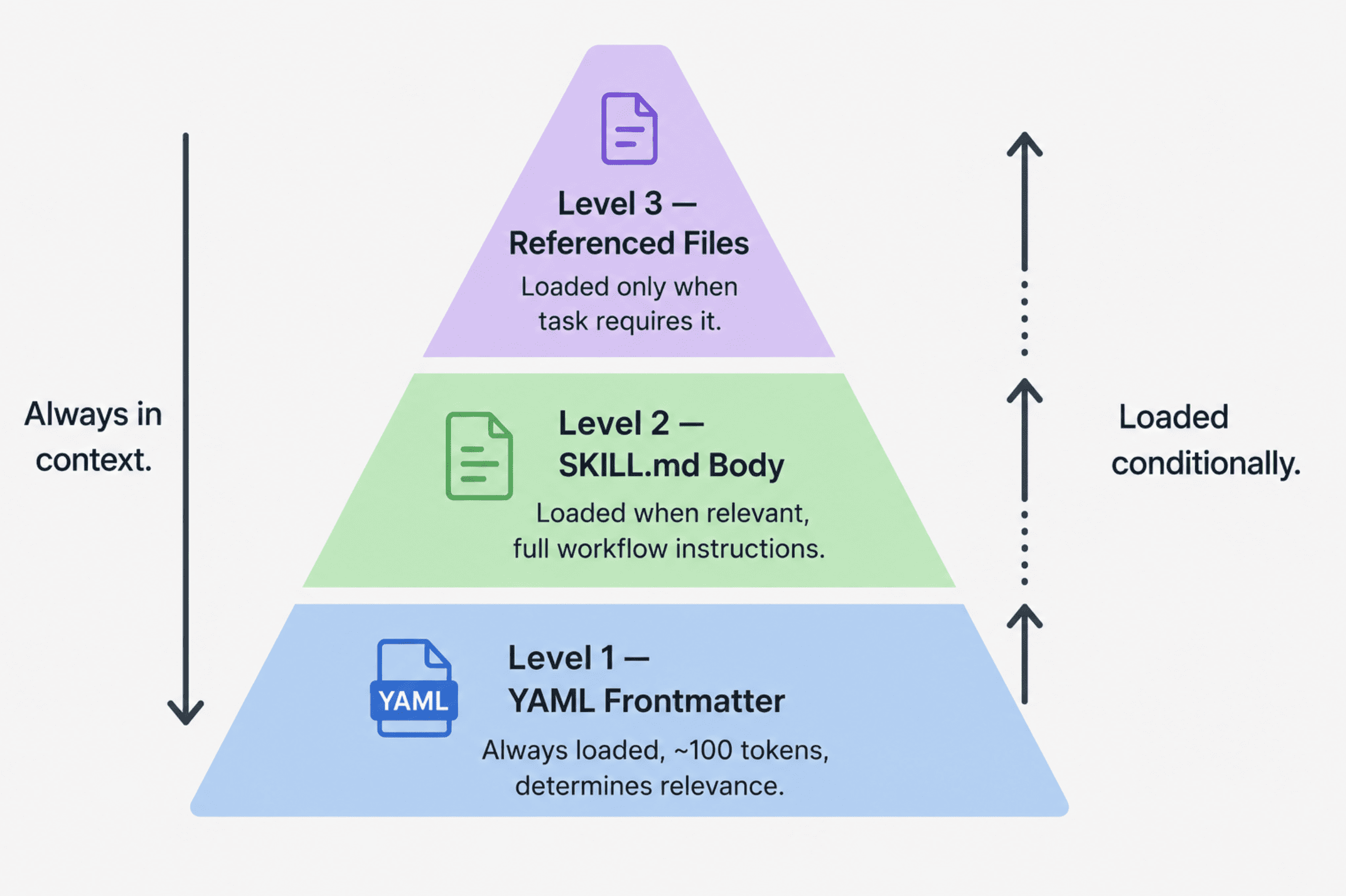
A three-tier pyramid diagram showing progressive disclosure
# Planning Your Skill Before You Write a Line
The most common mistake when building a skill is starting with the file structure rather than the use case. Anthropic's guide is explicit: identify two or three concrete use cases before touching any files.
A well-defined use case answers four questions:
- What does a user want to accomplish?
- What multi-step workflow does this require?
- Which tools are needed — Claude's built-in capabilities, or MCP-connected tools?
- What domain knowledge or best practices should be embedded that the user would otherwise need to explain every session?
A concrete use case definition looks like this:
Use Case: Blog Post Drafting
Trigger: User says "write a blog post", "draft content for our blog",
         or "create a post following our style guide"
Steps:
  1. Read the style guide from references/style-guide.md
  2. Confirm the topic and target audience with the user
  3. Draft following the header structure and tone guidelines
  4. Run the quality checklist before delivering the draft
Result: A complete draft that matches the company style guide without
        the user needing to paste guidelines into the chat
Anthropic's team has observed three categories that cover most skill use cases:
- Document and Asset Creation: Creating consistent, high-quality output documents, presentations, frontend designs, and code. The defining characteristic is embedded style guides and quality checklists. Claude's built-in code execution and document creation handle the output with no external tools required. The official Anthropic skills repository contains production-grade skills, including document skills for
docx,pdf,pptx, andxlsxmanipulation. Thefrontend-designskill is the canonical example here; it embeds design system tokens and component conventions so every generated UI follows the same standards. - Workflow Automation: Multi-step processes with consistent methodology, research pipelines, content workflows, and onboarding sequences. The key techniques are step-by-step workflows with validation gates between stages, templates for repeating structures, and iterative refinement loops. The
skill-creatorskill (which ships in the official Anthropic repo and helps you build other skills) is the reference example; it walks users through use case definition, frontmatter generation, and validation as a guided workflow. - MCP Enhancement: Workflow guidance layered on top of a working MCP server. If your users have connected Notion, Linear, or Sentry via MCP but do not know which workflows to run, an MCP enhancement skill provides the knowledge layer — sequencing tool calls, embedding domain expertise, and handling errors. Sentry's code review skill, which automatically analyzes and fixes bugs in GitHub pull requests using Sentry's MCP data, is the reference example from Anthropic's official guide.
Before writing any SKILL.md content, define your success criteria. Anthropic recommends two types. Quantitative: the skill triggers on at least 90% of relevant queries, completes the workflow in a defined number of tool calls, and produces zero failed API calls per run. Qualitative: users do not need to redirect Claude mid-workflow, outputs are structurally consistent across repeated runs, and a new user can accomplish the task on the first try without guidance. These are rough benchmarks rather than hard thresholds, but defining them upfront gives you something concrete to test against.
# The Technical Requirements
This is where most skills fail silently. The rules are strict, and the errors they produce are confusing because Claude simply will not load a skill that violates them — with no error message to explain why.
// File Structure
your-skill-name/
├── SKILL.md              # Required -- main skill file
├── scripts/              # Optional -- executable code
│   ├── process_data.py
│   └── validate.sh
├── references/           # Optional -- documentation loaded as needed
│   ├── api-guide.md
│   └── examples/
└── assets/               # Optional -- templates, fonts, icons
    └── report-template.md
// Critical Naming Rules
SKILL.mdis case-sensitive. The file must be named exactlySKILL.md. Variations likeskill.md,SKILL.MD, orSkill.mdwill not be recognized. Claude simply will not load the skill — no error, no warning.- Folder names must use
kebab-case. Lowercase letters and hyphens only. No spaces (Notion Project Setup), no underscores (notion_project_setup), no capitals (NotionProjectSetup). The folder name should match thenamefield in your frontmatter exactly. - No
README.mdinside the skill folder. All documentation for Claude goes inSKILL.mdorreferences/. If you are distributing on GitHub, put your human-readable README at the repository root, not inside the skill folder itself. - Reserved names: skill names cannot contain "claude" or "anthropic"; these are reserved by Anthropic and will be rejected.
- No XML angle brackets in frontmatter. Frontmatter appears directly in Claude's system prompt. XML-like content could inject unintended instructions, so this is a security restriction enforced at the platform level.
// YAML Frontmatter
The frontmatter is how Claude decides whether to load your skill. If it is weak or missing trigger conditions, the skill will not activate reliably. This is the single most common failure mode.
Minimal required format:
---
name: your-skill-name
description: What it does. Use when user asks to [specific phrases].
---
- The
namefield must be kebab-case and match the folder name exactly. - The
descriptionfield must include both what the skill does and when to use it. The character limit is 1024. According to Anthropic's engineering guidance, this field provides just enough information for Claude to know when each skill should be used without loading all of it into context. Descriptions without trigger conditions are the primary reason skills fail to load when they should.
Full format with all optional fields:
---
name: your-skill-name
description: What it does and when to use it. (Under 1024 characters, no XML tags.)
license: MIT
compatibility: Requires Claude Code with Python 3.9+ in the environment.
metadata:
  author: Your Name
  version: 1.0.0
  mcp-server: your-service-name
---
licensematters if you are making the skill open source.compatibility(1–500 characters) describes environment requirements; if the skill needs specific system packages, network access, or a particular product surface, document it here.metadataaccepts any custom key-value pairs;author,version, andmcp-serverare the most commonly used.
# Writing Skills That Actually Work
// The Description Field Formula
The structure that consistently produces reliable triggering: [What it does] + [When to use it] + [Key capabilities]. Anthropic's guide provides clear examples of both good and bad descriptions:
# Good -- specific task, specific trigger phrases, file type mentioned
description: Analyzes Figma design files and generates developer handoff
  documentation. Use when user uploads .fig files, asks for "design specs",
  "component documentation", or "design-to-code handoff".

# Good -- named service, concrete trigger language
description: Manages Linear project workflows including sprint planning,
  task creation, and status tracking. Use when user mentions "sprint",
  "Linear tasks", "project planning", or asks to "create tickets".

# Good -- end-to-end workflow, specific trigger phrases
description: End-to-end customer onboarding workflow for PayFlow. Handles
  account creation, payment setup, and subscription management. Use when
  user says "onboard new customer", "set up subscription", or
  "create PayFlow account".
Bad descriptions fail on specificity or omit triggers entirely:
# Bad -- too vague, no trigger conditions
description: Helps with design files.

# Bad -- no trigger phrases, no specific task
description: A workflow automation skill.

# Bad -- describes the domain, not the task or when to activate
description: For PayFlow users.
// Writing the Main Instructions Body
After the frontmatter, write the instructions in Markdown. The structure Anthropic recommends:
# Skill Name

## Instructions

### Step 1: [First Major Step]
Clear explanation of what happens and why.

```bash
python scripts/fetch_data.py --project-id PROJECT_ID
```

Expected output: [describe what success looks like]

## Examples

### Example 1: [Common scenario]
**User says**: "Set up a new marketing campaign"
**Actions:**
Fetch existing campaigns via MCP
Create new campaign with provided parameters
**Result:** Campaign created with confirmation link

## Troubleshooting

### Error: [Common error message]
**Cause:** [Why it happens]
**Solution:** [How to fix it step by step]
Four practices make instructions reliable in practice:
- Be specific and actionable — exact commands with expected outputs, not vague directives.
- Include error handling for every foreseeable failure mode.
- Reference bundled files clearly with the exact path so Claude knows where to look.
- Use progressive disclosure — keep
SKILL.mdfocused on core instructions and move detailed documentation toreferences/with a link, so Claude loads the extra detail only when the task needs it.
# A Complete Working Skill
This is a full, production-quality skill for a content writer who wants Claude to follow their company's article style guide automatically — in every session, without pasting the guidelines into the chat each time.
Folder structure:
blog-content-writer/
├── SKILL.md
├── references/
│   └── style-guide.md
└── assets/
    └── post-template.md
// SKILL.md Complete File
---
name: blog-content-writer
description: Drafts blog posts following the company's established style guide.
  Use when the user asks to "write a blog post", "draft content for the blog",
  "create a post", "write something for our engineering blog", or any request
  to produce long-form content for publication. Applies consistent voice, tone,
  header structure, and formatting automatically. Handles B2B SaaS topics,
  technical tutorials, and thought leadership content.
license: MIT
compatibility: Works in Claude.ai and Claude Code without external dependencies.
metadata:
  author: Content Team
  version: 1.1.0
---

# Blog Content Writer

Drafts blog posts that match the company style guide without requiring the
writer to paste guidelines into each session. Loads the style guide from
references/ and applies it consistently across every draft.

---

## Instructions

### Step 1: Load the Style Guide

Before drafting anything, read `references/style-guide.md` to load the current
voice, tone, formatting, and structural requirements. Do not rely on memory of
prior sessions -- always load fresh to catch any updates to the guidelines.

### Step 2: Clarify the Brief

If the user's request does not include all of the following, ask for them before
starting the draft -- all in one message, not one at a time:

- **Topic:** What is the post about?
- **Target audience:** Developers, executives, or general business readers?
- **Word count target:** Short (500-800 words), medium (1,000-1,500 words), or long (2,000+)?
- **Primary goal:** Inform, persuade, drive signups, or establish authority?

### Step 3: Draft the Post

Once you have the brief, draft the post applying the guidelines from
`references/style-guide.md`:

- Intro formula: hook → context → promise (see style guide for examples)
- Header hierarchy: H2 for main sections, H3 for subsections only
- Sentence length: mix short (under 12 words) and medium (12-22 words)
- Paragraph length: 2-4 sentences, never a single-sentence paragraph
- Voice: direct, active, no jargon unless audience is confirmed technical

Run the quality checklist in Step 4 before delivering.

### Step 4: Quality Checklist

Before returning the draft, verify each item. Fix failures before delivering --
do not return a draft with known checklist failures.

□ Does the intro follow the hook → context → promise formula?
□ Is every H2 a specific claim or question, not a vague label?
□ Are all paragraphs 2-4 sentences?
□ Is passive voice absent or near-absent?
□ Is the conclusion actionable -- does it tell the reader what to do next?
□ Does the post stay on the single topic defined in the brief?
□ Is the word count within 10% of the target?

### Step 5: Deliver with a Summary

Deliver the draft followed by a brief summary block:

Draft summary:
- Word count: [actual count]
- Target: [target count]
- Audience: [audience confirmed in brief]
- Checklist: All 7 items passed / [list any exceptions with explanation]

---

## Examples

### Example 1: Complete brief -- proceed directly to draft

**User says:** "Write a 1,200-word blog post about why B2B teams should adopt
async documentation practices, for a developer audience."

**Actions:**
1. Load `references/style-guide.md`
2. Brief is complete -- proceed to draft without asking clarifying questions
3. Apply developer-audience voice: precise, active, code examples welcome
4. Run quality checklist -- fix any failures before delivering
5. Deliver draft with summary block

**Result:** ~1,200-word draft followed by summary showing all checklist items passed

### Example 2: Incomplete brief -- ask before drafting

**User says:** "Write a blog post about our new pricing tiers."

**Actions:**
1. Load `references/style-guide.md`
2. Brief is incomplete -- target audience, word count, and goal are missing
3. Ask: "Happy to draft this. Before I start -- who is the primary audience
   (existing customers, prospects, or both)? What word count are you targeting?
   And what should a reader do after finishing the post?"
4. Wait for the answers before writing a single word of the draft

**Result:** Clarification questions delivered in one message

---

## Troubleshooting

### Problem: Draft does not match expected voice or tone

**Cause:** The style guide reference may have been updated since the skill was last tested,
or the brief did not specify a target audience clearly enough.

**Solution:**
1. Open `references/style-guide.md` and confirm it reflects the current guidelines
2. If the style guide is correct, identify the specific sentence or paragraph
   that violates a guideline and name which rule it breaks -- this gives a
   concrete correction target rather than a vague revision request

### Problem: Skill does not trigger automatically

**Cause:** The request phrasing did not match trigger conditions in the description.

**Solution:** Use explicit trigger language -- "Write a blog post about X following
our style guide." Or invoke directly: "Use the blog-content-writer skill to draft..."
After confirming it triggers correctly, explicit invocation becomes optional.

### Problem: Quality checklist failures persist after revision

**Cause:** Conflicting instructions between the brief and the style guide.

**Solution:** Identify the specific conflict explicitly before requesting another
revision. Example: "The brief asks for casual tone but the style guide specifies
formal -- which takes priority for this post?" Resolve the conflict first.
// references/style-guide.md
This file demonstrates how progressive disclosure works in practice. It is only loaded when the skill body instructs Claude to read it, keeping the main context lean while making detailed guidelines available when actually needed.
# Company Blog Style Guide
Version 1.1 -- Updated May 2026

This file is loaded by the blog-content-writer skill whenever a blog post
is drafted. To change style standards, update this file. No changes to
SKILL.md are required.

---

## Voice and Tone

**Voice:** Direct, confident, concrete. Write like a knowledgeable colleague
explaining something to a peer -- not a textbook, not a press release.

**Tone by audience:**
- Developers: technical precision, active verbs, code examples welcome
- Executives: outcome-focused, minimal implementation detail, lead with impact
- General business: plain language, every piece of jargon defined on first use

**Never use:** Passive voice, hedging phrases ("it could be argued that"),
corporate jargon ("leverage", "synergize", "operationalize"), or vague
superlatives ("best-in-class", "cutting-edge").

---

## Structure

**Intro formula -- hook, context, promise:**
1. Hook: One sentence naming the problem or a surprising fact
2. Context: Two to three sentences explaining why this matters now
3. Promise: One sentence stating exactly what the reader will leave with

**Header rules:**
- H2: specific claim or question -- never a vague label
  - Good: "Why async documentation cuts onboarding time by 40%"
  - Bad: "Benefits of async documentation"
- H3: only when a section has three or more distinct sub-points
- No H4 or deeper -- restructure if you need that many nesting levels

**Conclusion:** Must include a specific, actionable next step the reader
can take in the next 24 hours. Not "let us know your thoughts."

---

## Formatting

- Paragraph length: 2-4 sentences. Never one sentence, rarely five.
- Sentence length: vary deliberately. Short (under 12 words) mixed with
  medium (12-22 words). Never exceed 30 words in a single sentence.
- Bold for key terms and important phrases -- not for decoration
- Code blocks for any code, command, or config value, even short ones
- Lists only when items are genuinely parallel and discrete -- not as a
  substitute for prose that actually connects ideas
Now that we have this, let's install and run:
In Claude.ai:
- Zip the
blog-content-writer/folder - Go to Settings > Capabilities > Skills
- Upload the zip file
- Test with: "Write a blog post about remote work culture for a general business audience"
Claude Code global installation:
# Create the global skills directory
mkdir -p ~/.claude/skills

# Copy the skill
cp -r blog-content-writer/ ~/.claude/skills/

# Confirm
ls ~/.claude/skills/
Claude Code local installation:
# Create the project-level skills directory
mkdir -p ./.claude/skills

# Copy the skill
cp -r blog-content-writer/ ./.claude/skills/

# Confirm
ls ./.claude/skills/
After installing, test with explicit invocation on the first run:
"Use the blog-content-writer skill to draft a 1,000-word post about async
documentation practices for a developer audience."
Once you confirm it triggers correctly, the explicit invocation becomes optional, and the skill loads automatically when Claude recognizes the task.
# Testing Your Skill
Anthropic's official guide recommends three testing approaches scaled to the skill's visibility: manual testing in Claude.ai for fast iteration with no setup, scripted testing in Claude Code for repeatable validation across changes, and programmatic testing via the Skills API for systematic evaluation suites. A skill used by a small internal team has different requirements than one deployed to thousands of users; choose accordingly.
The single most useful tip from the official guide: iterate on a single challenging task until Claude succeeds, then extract the winning approach into the skill. Do not start with broad coverage. Get one hard case working perfectly, then expand your test matrix.
Three areas to test:
1. Triggering tests: Does the skill load when it should? Does it stay quiet when it should not? Build a test matrix before you ship:
Should trigger:
  "Write a blog post about our product launch"
  "Draft content for the engineering blog"
  "Create a post following our style guide"
  "I need a 1,500-word piece on async communication for developers"

Should NOT trigger:
  "Summarize this article for me"
  "Help me fix this Python function"
  "Write an email to the sales team"
  "Create a presentation about Q4 results"
Run 10–20 should-trigger queries and track how many activate the skill automatically versus requiring explicit invocation. Aim for 90%+ automatic triggering on relevant requests.
2. Output quality tests: Run the same request three to five times and compare outputs for structural consistency. Test edge cases: a topic with no clear conclusion, a brief with conflicting instructions, a word count target that is impractically short or long. After any edit to SKILL.md or references/style-guide.md, rerun the full test matrix before distributing.
3. Regression tests: The most common regression is a description edit that narrows triggers too aggressively and breaks previously working queries. After any frontmatter change, run your should-trigger suite in full before sharing the updated skill.
# Distributing Your Skill
Individual users download the skill folder, zip it if needed, and upload via Settings > Capabilities > Skills in Claude.ai, or copy it to the appropriate Claude Code skills directory using the commands above.
Organization-level distribution is handled by admins who can deploy skills workspace-wide, with automatic updates and centralized management — a capability that shipped December 18, 2025. Once deployed at the organization level, every member's Claude instance loads the skill without individual installation steps.
GitHub distribution is the standard approach for community sharing. The key structural rule: your human-readable README.md goes at the repository root, not inside the skill folder. Install instructions should reference the Claude Code plugin command:
# Register the repository as a marketplace
/plugin marketplace add your-org/your-repo

# Install a specific skill from it
/plugin install your-skill-name@your-marketplace-name
Anthropic published Agent Skills as an open standard at agentskills.io. The standard is explicitly portable — the same SKILL.md format is designed to work in Claude and other AI platforms that adopt it. Anthropic's official repository is the canonical reference for structure, naming conventions, and quality standards.
# Common Patterns and Troubleshooting
A quick reference for the most common issues:
| Problem | Likely Cause | Fix |
|---|---|---|
| Skill never triggers | Vague description, missing trigger phrases | Rewrite description with specific user-facing language |
| Skill triggers constantly | Description too broad | Add explicit "Do NOT use when" conditions |
| Instructions ignored | Vague or conflicting directives | Make specific: exact commands, expected outputs |
| MCP calls fail | Server not running or auth expired | Add reconnection steps to the troubleshooting section |
| Works in Claude.ai, fails in Code | Missing environment dependencies | Document requirements in compatibility field |
| Inconsistent output across sessions | Instructions too flexible | Add a quality checklist and require self-verification |
# Wrapping Up
Skills are the mechanism for turning domain expertise and workflow knowledge into something Claude carries forward — not as re-pasted context in every session, but as loaded capability that activates when it is relevant. The architecture is intentionally simple: a folder, a markdown file, and optional supporting directories. The complexity lies in how precisely you define what you want Claude to do, not in the tooling.
The official Anthropic guide promises a working skill in 15–30 minutes using the skill-creator meta-skill, which ships in the official repository and walks you through the process interactively. Start with one concrete use case. Define your trigger conditions before you write instructions. Test triggering behavior before you test output quality. Then iterate on the single hardest task in your use case until it works and extract that approach into the skill. The rest scales from there.
Shittu Olumide is a software engineer and technical writer passionate about leveraging cutting-edge technologies to craft compelling narratives, with a keen eye for detail and a knack for simplifying complex concepts. You can also find Shittu on Twitter.